Apps
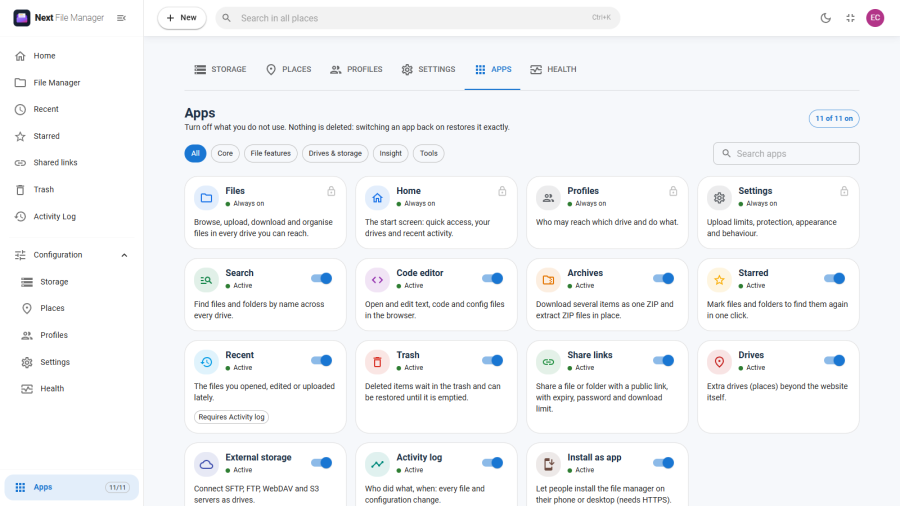
Switch off the parts of Next File Manager you do not use, at Configuration → Apps.
Every feature that can be switched off is an app with its own card. Turn one off and its menu entries, screens and actions disappear for everyone. Nothing is deleted: switch it back on and it returns exactly as it was.
Who can use it
Anyone who can change Settings can switch apps: Super Users, and profiles allowed to edit Settings. People who can only view Settings see the screen with the switches greyed out.
The Apps screen itself cannot be switched off, and neither can the Health screen.
The apps
Always on
These four are the product itself. They carry a padlock instead of a switch and show Always on.
| App | What it is |
|---|---|
| Files | Browsing, uploading, downloading and organising files |
| Home | The start screen: quick access, your drives and recent activity |
| Profiles | Who may reach which drive and do what |
| Settings | Upload limits, protection, appearance and behaviour |
Can be switched off
All of these are on after installing.
| App | Category | What switching it off removes |
|---|---|---|
| Search | File features | Searching files and folders by name, and the Search tab in Settings |
| Code editor | File features | Opening and editing text, code and config files in the browser |
| Archives | File features | Downloading several items as one ZIP, and extracting ZIP files |
| Starred | File features | Starring files and folders, and the Starred screen |
| Recent | File features | The Recent screen. Requires Activity log |
| Trash | File features | The Trash screen, and the Trash tab in Settings. Deleting then removes items for good |
| Share links | File features | Creating public links, the Shared links screen, and the Sharing tab in Settings. Existing links stop working |
| Drives | Drives & storage | Extra drives (places) beyond the website itself, and the Places screen |
| External storage | Drives & storage | SFTP, FTP, WebDAV and S3 connections, and the Storage screen. Requires Drives |
| Activity log | Insight | The Activity Log screen |
| Install as app | Tools | Installing the file manager on a phone or desktop as a Progressive Web App (PWA) |
Finding an app
The category buttons at the top filter the cards: All, Core, File features, Drives & storage, Insight and Tools. The Search apps box filters by name and description.
The counter at the top right, for example 11 of 11 on, shows how many of the optional apps are running.
Switching an app off
- Turn off the app's switch.
- A dialog asks you to confirm. It says what will be hidden, and how much is affected. For example, how many share links will stop working, or how many items are in the Trash.
- If other apps depend on this one, the dialog lists them under This also pauses:.
- Click Turn off.
- Click Save in the bar at the bottom of the screen. Discard drops your changes.
The page reloads after saving, so every screen picks up the new state.
Dependencies
Some apps need another app to work. Their card shows a Requires chip:
- Recent requires Activity log.
- External storage requires Drives.
When a required app is off, the app that needs it shows Paused. Its own switch stays on, so it comes back by itself when you switch the required app on again.
Switching an app on also switches on what it requires.
What is kept
Switching an app off hides it. It does not delete its data.
- Trash: items already in the Trash stay there. New deletions are permanent while the app is off.
- Share links: links are kept, but they stop working. Switch the app back on and they work again, unless they expired in the meantime.
- Starred and Activity log: stars and log entries are kept but not shown.
- Drives and External storage: drives and connections are kept but hidden.
Enforcement
A switched-off app is not only hidden. The server refuses its actions too, with the message "This feature is switched off in the Apps manager." Switching an app off is a safe way to make sure a feature cannot be used.